The image smiley.png will be convolved with several PSF.
Before applying the convolutions, you need to convert the image into float (skimage.img_as_float).
What does the acronym PSF stand for?
Compute the convolution between the image and a Gaussian kernel (
skimage.filters.gaussian).Compute the convolution between the image and the kernel defined by
by using
scipy.ndimage.convolveand initializing withnumpy.array. Note that being an image, it should be defined as a 2D matrix!Compute the convolution between the image and a kernel defined by an array of 30 elements equal to 1/30 (
numpy.ones).
Objectives
Know how to use the function
scipy.ndimage.convolveto apply the convolution product.Be able to identify the kernel applied on a convolved image.
Computing the convolution between two images
The point spread functions
Before convolving the image by the different filters, it is interesting to display the filters themselves.
In case there is no explicit matrix to represent a filter, as with the Gaussian filter skimage.filters.gaussian,
we can simply convolve the filter by an image containing only one non-zero pixel,
(this image is sometimes denoted ).
The function skimage.filters.gaussian defines a Gaussian kernel.
The result of the function is the convolution product of this Gaussian kernel with the image given as a parameter of the function.
The two last kernels are defined with (note the double brackets, so as to get a 2D array):
h = np.array([[1, -1]])and
N = 30
h = np.ones((1,N)) / N
The convolutions
The results of the convolutions are shown below, for both the (first row) and the smiley (second row).
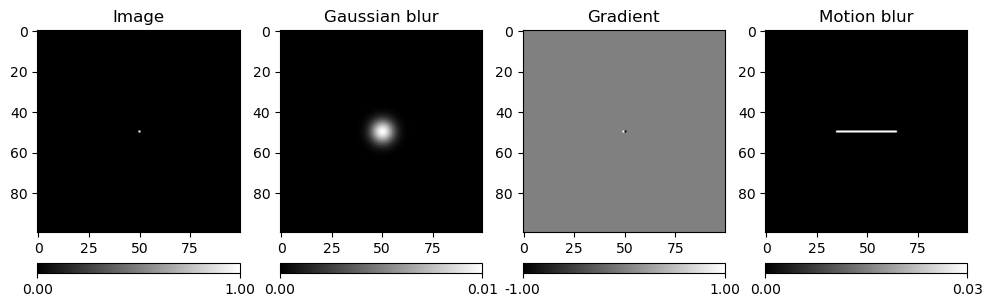
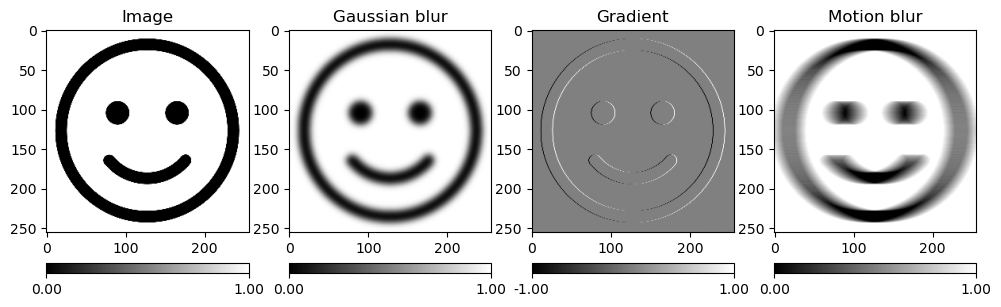
The “gradient” image (third image) brings out the vertical contours of the image. We will reuse this filter in Edge detection.