Mathematical morphology gathers several techniques based on set theory, lattice theory, and topology. It was initially dedicated to binary images but has now been extended to grayscale images. In this course, we limit the presentation to binary images, therefore we consider that the objects in the image define a set of pixels.
Set operations
Consider the two following sets and :
Set :

Set :
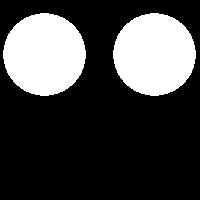
Then we have the following operations.
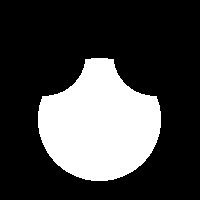
The complement of is denoted and is the set of pixels that are not in :

The union is the set of pixels present in or or both:

The intersection is the set of pixels present simultaneously in and :

The (set) difference is the set of pixels present in but not in :
Structuring element
In addition to this, the operators of mathematical morphology need a so-called structuring element (french: élément structurant). A structuring element is a set of pixels (equivalent to a binary image) associated with an origin. Generally, the origin is located at the centre of the structuring element; but it may be elsewhere, even outside the pixels of the structuring element. In the sequel, we denote by the structuring element centered on the pixel .
Basic operations
Dilation
Having an image and a structuring element , the dilation (french: dilatation) of by is noted . The result of the dilation is obtained by moving the origin of the structuring element onto the white pixels of the image and keeping the set of pixels of each displaced structuring element.
Mathematically speaking:
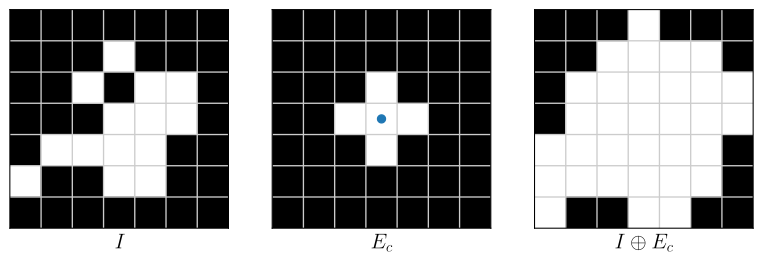
Figure 7:Example of dilation on a small image by the structuring element (with the origin is at the centre and represented by the blue dot).
The structuring element is often described with a matrix. So, the structuring element in Figure 7 is written as:
Note that the matrix does not consider the zero pixels surrounding the main part of .
Dilation has the following properties:
Dilation is a binary operation and is not linear. Therefore, it cannot be expressed as convolution (which is a linear mathematical operator).
Dilation is associative, i.e. the application of two consecutive dilations can be done in any order:
(here, the subscripts 1 and 2 mean two different structuring elements.)
Dilation is a monotonous operation since the relations of inclusions are conserved:
Erosion
The erosion (french: érosion) of by is noted . The result of the erosion is obtained by moving the structuring element into the white pixels of the image and keeping only the origin of each displaced structuring element.
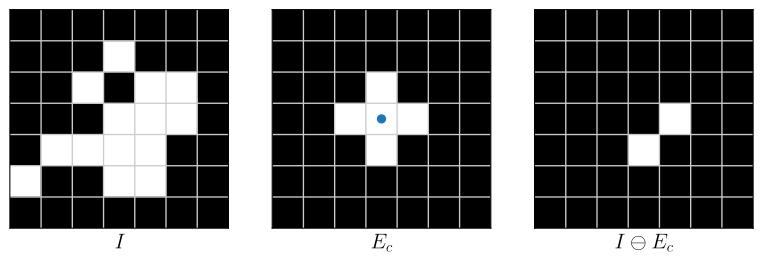
Figure 8:Example of erosion on a small image by the structuring element (with the origin is at the centre and represented by the blue dot).
Erosion has similar properties as dilation:
Erosion cannot be expressed as convolution.
Erosion is associative:
Note that the result of two successive erosions is equivalent to an erosion whose structuring element is the dilation of the two structuring elements.
Erosion is a monotonous operation:
Duality
Dilation and erosion are dual operators. Considering the background as the object and the object as the background (i.e. by working with the complement of the image), the dilation is converted to erosion and vice versa:
Composition of basic operators
Opening
Opening (french: ouverture) consists of an erosion followed by a dilation. The erosion removes small objects but also decreases the size of bigger objects. To avoid this, the result is dilated with the same structuring element.
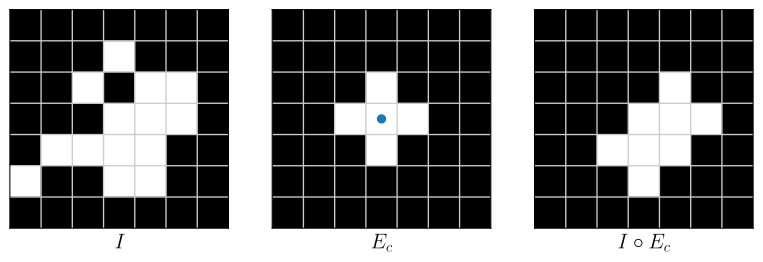
Figure 9:Example of an opening on a small image by the structuring element (with the origin is at the centre and represented by the blue dot).
Opening is an idempotent operation, that is to say, applying twice the same opening gives the same result as only one opening:
Closing
Contrary to opening, closing (french: fermeture) is firstly a dilation, then an erosion. Indeed, dilation closes holes but enlarges objects. To avoid the widening of the objects, an erosion can be applied with the same structuring element.
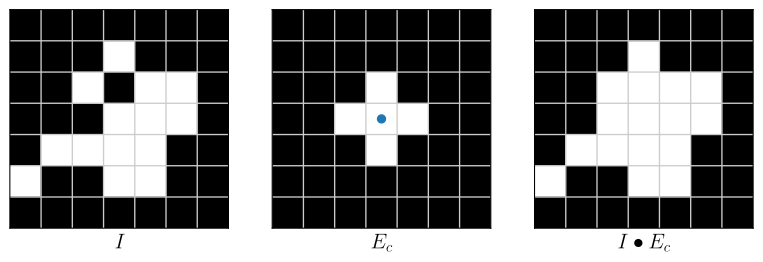
Figure 10:Example of closing on a small image by the structuring element (with the origin is at the centre and represented by the blue dot).
Similarly to opening, closing is an idempotent operation: